

LSS-PRO Arduino Firmware
Last modified by Eric Nantel on 2024/07/23 07:15
Table of Contents
Prerequisites
- Download & install STM32CubeProgrammer from the ST Website
- Download & install Arduino IDE from the Arduino Website
Setup
In Arduino IDE you need to install and setup the proper Board
click on File > Preferences and add the URL below to Additional Boards Manager URLS
https://github.com/stm32duino/BoardManagerFiles/raw/main/package_stmicroelectronics_index.json
IMPORTANT NOTE: If there are multiple board URLs, separate each URL by putting a comma as shown below.
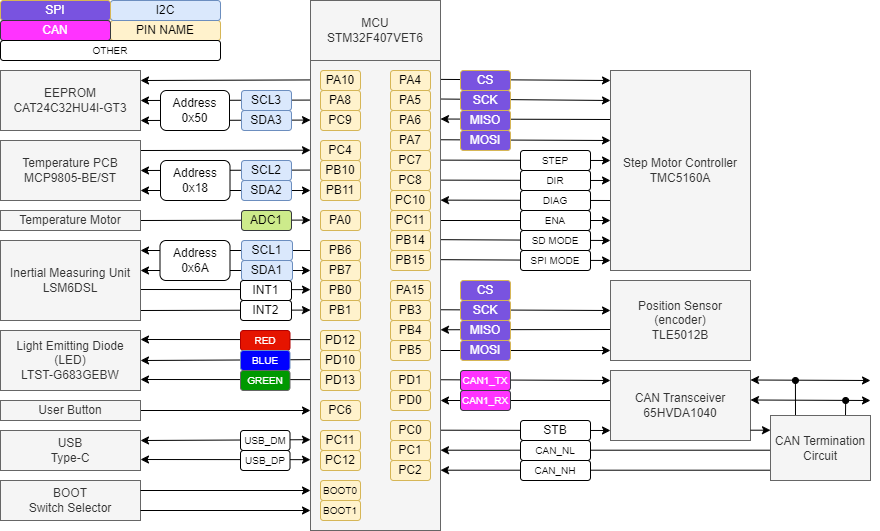
Pinout / System Diagram
Datasheet / Examples
| Hardware | Information | ||
Light Emitting Diode (LED) | |||
| LSS-P-RGB-Blink - Arduino Example | GitHub | ||
| LSS-P-RGB-Rainbow - Arduino Example | GitHub | ||
Inertial Measuring Unit (IMU) | |||
| LSS-P-IMU - Arduino Example | GitHub | ||
| Digital Temperature for the Bottom PCB | |||
| LSS-P-PCB-Temp - Arduino Example | GitHub | ||
| EEPROM | |||
| LSS-P-EEPROM - Arduino Example | GitHub | ||
| Step Motor Controller | |||
| LSS-P-Motor - Arduino Example | GitHub | ||
| Push Button | |||
| LSS-P-Button - Arduino Example | GitHub | ||
| Serial to USB | |||
| LSS-P-Serial-Echo - Arduino Example | GitHub | ||
| Magnetic Position Sensor | |||
| Coming Soon | Coming Soon | ||