

The Complete Hexapod 2 Tutorial
The Complete Hexapod 2 Tutorial
Updated January 26, 2007
Hardware
SSC-32, Bot Board / BASIC Atom 28, PS2 Cable, PS2 Wireless Controller (not included), Extreme Hexapod 2, L5/L6 Arm (optional), Sharp GP2D12 Sensor (optional)
Software
LynxTerm | Basic Micro Atom IDE ver 2.2.1.1
Note: if your Basic Atom chip has a "Rev-D" label on the bottom, you must use IDE v5.3.1.3.
Hexapod Programs:
h2prog1.zip |
h2prog2.zip |
h2prog3.zip |
h2prog4.zip |
h2l56p5.zip |
h2prog6.zip |
h2prog7.zip Autonomous
Resources
Wiring Schematic (wd001.gif) | Wiring Schematic (h2l56wd.gif)
Goal
Install, program, and test the electronics to operate a Hexapod 2 with optional L5/L6 arm from a Lynxmotion, MadCatz, Pelican, or Hiteck wireless controller.
Install the Bot Board and SSC-32 onto the top of the robot as shown.
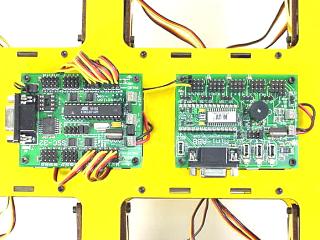 Figure 1.
Connect power wires for the servos as illustrated. Install VS1=VS2, VL=VS1, TX and RX, and both Baud jumpers for these tests. This will set the Baud rate to 115.2k and allow DB9 communications. Consult the SSC-32 user manual for more detailed information.
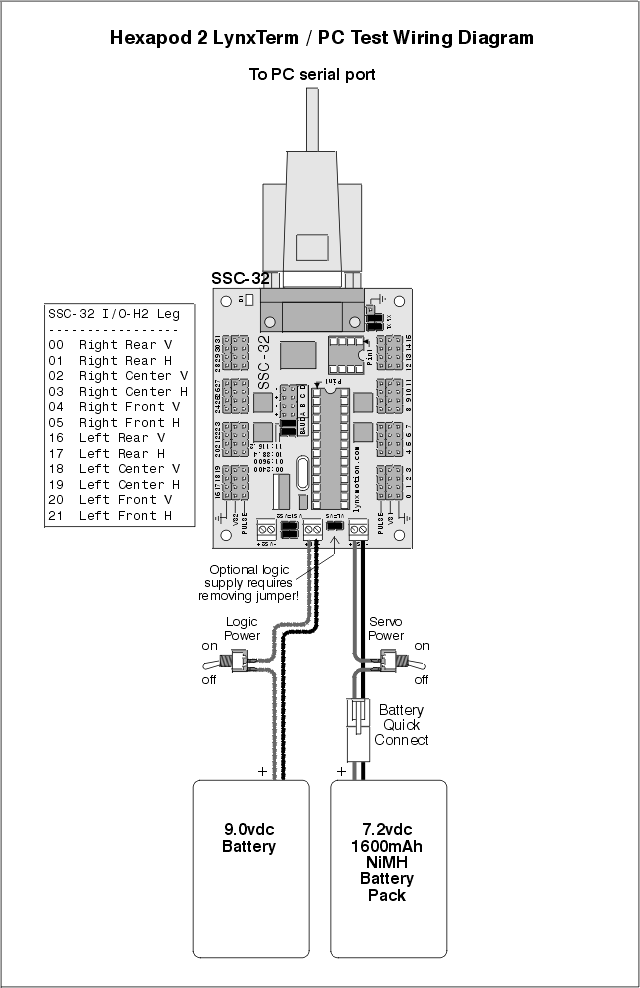 Figure 2. (click for printable version)
Connect the servos to their appropriate I/O channels. See Table 3 and consult the SSC-32 user manual. Double check your work — the header pins are close and numerous.
| SSC-32 I/O | Servo |
| 00 | Right Rear Vertical |
| 01 | Right Rear Horizontal |
| 02 | Right Middle Vertical |
| 03 | Right Middle Horizontal |
| 04 | Right Front Vertical |
| 05 | Right Front Horizontal |
| 16 | Left Rear Vertical |
| 17 | Left Rear Horizontal |
| 18 | Left Middle Vertical |
| 19 | Left Middle Horizontal |
| 20 | Left Front Vertical |
| 21 | Left Front Horizontal |
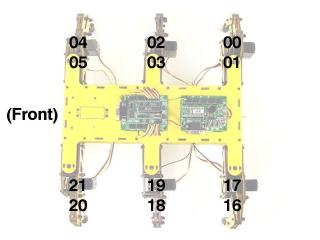 Figure 3.
Step 4a. Connect the serial data cable to the PC's serial port (recognized by 9 pins that stick out).
Step 4b. Connect the other end of the serial data cable to the SSC-32's DB9 port. Turn on the power.
Note: you can also use an IOGear USB-to-Serial adaptor.
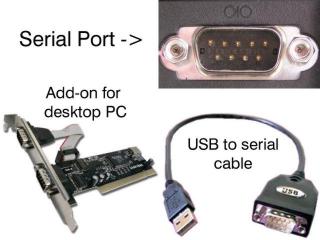 Figure 4.
Install and run LynxTerm on your PC. Choose the COM port from the drop down menu in the upper left corner.
Click in the black text box and type "ver". If everything is working correctly, you should receive a response such as "SSC32-1.03XE".
Note: if text goes below the bottom of the box, it may be necessary to change font settings and/or the number of rows under Terminal Setup.
 Figure 5. (click to enlarge)
Click on the Sequencer button in the lower left corner. Click "All = 1500" and notice the hexapod legs hold position. If the robot was constructed properly, the legs will be horizontal and perpendicular to the body.
If your robot does not have mechanical alignment, use the Offset tool under Servo Quick Test. Select each servo on the Hexapod diagram and adjust the offset slider. Do this for all twelve servos. When completed, click Config to display configuration data. The lines starting with "#0PO" can be cut and pasted into the serout command in the included programs — search for "Servo Offset" in the supplied programs and follow the instructions.
 Figure 6. (click to enlarge)
The L* and R* textboxes control the positions the legs move to in the sequence. Fine-tune these values using the Servo Quick Test position slider.
| Tripod Leg Movement Sequence | |||
| LF | Left Front Horiz | RF | Right Front Horiz |
| LH | Left High Vertical | RH | Right High Vertical |
| LM | Left Middle Vertical | RM | Right Mid Vertical |
| LL | Left Low Vertical | RL | Right Low Vertical |
| LR | Left Rear Horiz | RR | Right Rear Horiz |
 Figure 7. (click to enlarge)
Adjust the XL and XR sliders to 100%. Set the XS slider to ~50% and notice the stride takes 3 seconds. Adjust HT to 1000 and the stride now takes 2 seconds.
You have complete control over all aspects of the tripod gait. Adjust XL or XR lower to do gradual turns. Setting them to opposite directions causes the robot to turn in place. Reverse values cause backward walking.
 Figure 8. (click to enlarge)
Remove the TX and RX jumpers, install the data cable to the Bot Board, and configure the Baud rate jumpers for 38.4k. To change speed and direction, alter the XL, XR, XS values.
Install and run the BASIC Atom IDE to allow programming the chip. The following programs offer complete control through a wireless PS2 controller.
| Filename | Description |
| h2prog1.zip | Differential tank-steer mode |
| h2prog2.zip | Above, and single joystick mode |
| h2prog3.zip | Above, and leg high-position adjustable |
| h2prog4.zip | Above, leg low-pos. adjustable and obstacle detection |
| h2l56p5.zip | Above, and L5/L6 arm control |
| h2prog6.zip | Same as h2prog4, single joystick mode and pan-and-tilt on left joystick |
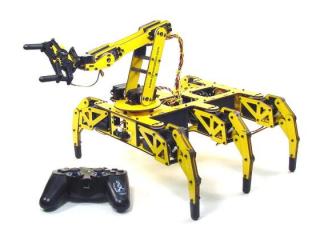 Figure 10.
Wire your robot as illustrated in the wiring diagram. The Sharp GP2D12 is not required, but offers crash protection if installed.
You can use a 7.2VDC battery for best performance, however if installing an L5 or L6 arm, 6.0VDC is recommended due to the micro servo on the gripper. For increased runtime, you can power the logic of the Bot Board and SSC-32 from a 9V battery — remember to remove the VS=VL jumpers on both boards.
Install the speaker enable jumper for audible feedback. Install the PS2 receiver module and put fresh batteries in your controller. When you run the program, you should hear beeps until the game controller is recognized. Press the Analog button and the legs should hold position.
 Figure 11. (click for printable version)
Install the Playstation 2 cable as illustrated in Figures 12-1 and 12-2.
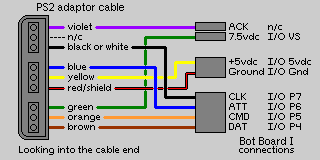
Figure 12-1.
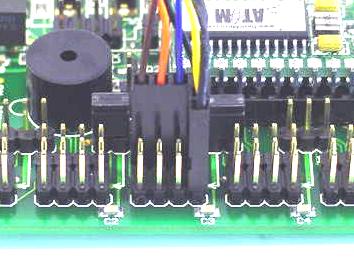 Figure 12-2.
Make sure the controller is in Analog mode. Mode 1 (default) uses differential/tank mode — the right joystick controls the right legs, and the left joystick controls the left legs. Mode 2 controls walking direction with the right joystick. Pressing R3 swaps between modes.
Both modes offer control of leg trajectory. Pressing △, O (default), X, or □ changes how the foot is lifted. Control max vertical height with R1/R2. Control max low position with L1/L2 or D-Pad Up/Down.
If the robot is driven toward an obstacle, the forward joystick position is ignored after a threshold is reached. The controller will vibrate proportionally to obstacle distance. The Sharp sensor can be enabled/disabled with the Start button.
 Figure 13. (click to enlarge)
The Select button switches between Hexapod and Arm control modes.
Arm control: Move X and Y with the Left joystick, move Z (Base Rotate) and Wrist Angle with the Right joystick, close/open gripper with L1/L2, turn Wrist (L6 only) with R1/R2, invert X axis with L3, initialize Arm position with X, disable/enable Arm servos with △.
PS2 Controls — Default Tank Mode:
| L Joy U | Left Side Forward | R Joy U | Right Side Forward |
| L Joy D | Left Side Backward | R Joy D | Right Side Backward |
| L1 | Raise body height | R1 | Increase leg lift |
| L2 | Lower body height | R2 | Decrease leg lift |
| L3 | N/A | R3 | Switch control mode |
| D-Pad U | Raise body height | △ | Figure 12 |
| D-Pad D | Lower body height | X | Figure 12 |
| D-Pad L | Speed Limit Down | □ | Figure 12 |
| D-Pad R | Speed Limit Up | O | Figure 12 |
| Start | Dis/En Crash Monitor | Select | Switch to Arm mode |
PS2 Controls — Right-Joystick Mode:
| L Joy U/D/L/R | N/A | R Joy U | Forward |
| R Joy D | Backward | ||
| R Joy L | Left | ||
| R Joy R | Right |
PS2 Controls — Arm Control:
| L Joy | Move X and Y | R Joy | Move Z and Wrist |
| L1 | Close Gripper | R1 | Turn Wrist Right |
| L2 | Open Gripper | R2 | Turn Wrist Left |
| L3 | Invert X Axis | R3 | Switch control mode |
| X | Home Position | △ | Disable/Enable Servos |
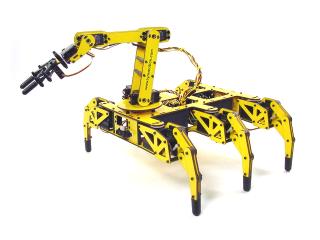 Figure 14.
The autonomous program requires three Sharp GP2D12 sensors connected as follows:
- A to D channel 0: front left side, facing right
- A to D channel 1: front right side, facing left
- A to D channel 2: rear, facing behind the robot
| Filename | Description |
| h2prog7.zip | Autonomous using two Sharp GP2D12 sensors and one on the rear |
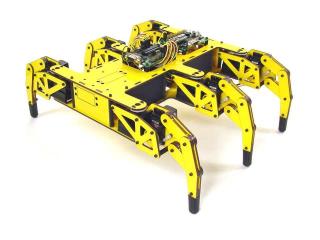 Figure 15.