

Configuring RIOS for the AL5 Series Robot Arms
Last modified by Eric Nantel on 2026/04/06 10:59
Configuring RIOS for the AL5 Series Robot Arms
Updated December 2, 2008
RIOS — Main Screen
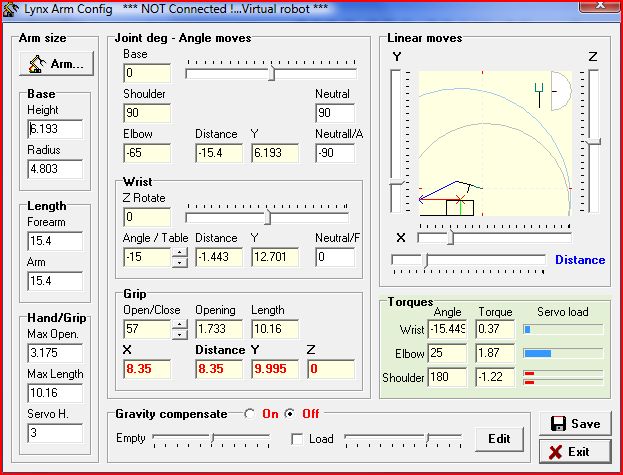 Figure 1 — RIOS main screen.
RIOS — Arm Size Configuration Values
Click on "Arm..." then select "SES" and "New Design" base. This will give you the most similar setup with the correct gripper option. You will need to change the following dimensions under the "Arm Size" heading.
| All Arms | |
|---|---|
|
Base: Height = 6.9 cm Hand/Grip: Max Length (No Wrist Rotate) = 8.7 cm Hand/Grip: Max Length (With LW Rotate) = 11.3 cm Hand/Grip: Max Length (With HD Rotate) = 10.0 cm |
|
| AL5A | AL5B |
| Length: Forearm = 10.8 cm Length: Arm = 9.4 cm |
Length: Forearm = 12.7 cm Length: Arm = 11.9 cm |
| AL5C | AL5D |
| Length: Forearm = 15.4 cm Length: Arm = 15.6 cm |
Length: Forearm = 18.7 cm Length: Arm = 14.7 cm |