

The Complete T-Hex 4DoF Tutorial (Bot Board II)
The Complete 4DOF T-HEX Tutorial
Updated January 5, 2011
This guide follows the T-HEX assembly guide. The purpose is to calibrate the servos and control the robot with a PS2 remote control.
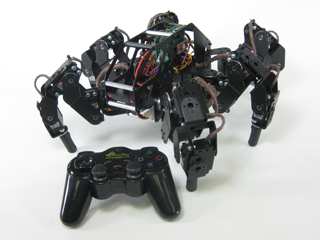
Image of 4DOF T-HEX.
Hardware & Software
Hardware: 4DOF T-HEX Hexapod | SSC-32 | Bot Board II | BASIC Atom Pro 28 | PS2 Cable | PS2 Wireless Controller
Software: Basic Micro Studio
Place the robot on top of a CD spindle or similar to hold the legs off the ground.
Download and install LynxTerm. Connect the SSC-32 to the serial port and apply power. The green LED should light and stay on until it receives a valid serial command.
Please consult the serial troubleshooting guide if you have difficulties.
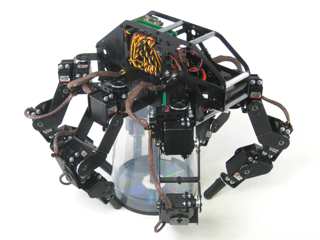 Figure 1.
Download the 2.04GP Beta firmware. Remove power from the SSC-32 and make sure the baud rate is set to 115.2k.
Apply power again, ensure it's connected to the PC, and click "Firmware" at the bottom of the LynxTerm screen. Click "Open" and browse to the firmware file. Click "Begin Update".
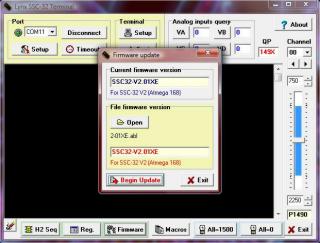 Figure 2.
When the firmware update is complete, click "Ok" then "Exit". Do the "ver" test: type "ver" into the terminal and press Enter. You should see the proper firmware version returned.
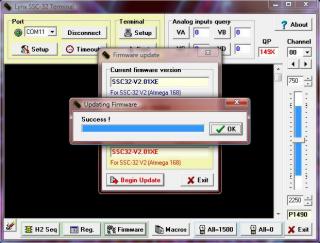 Figure 3.
Place the robot as close to neutral position as possible. Click "All=1500" in the bottom right of the screen. The robot should hold the neutral position, resembling Figures 6, 7, 8, and 9.
If joints are off by more than 15°, remove the center screw from the servo horn, pull the horn off, rotate until aligned, then reattach.
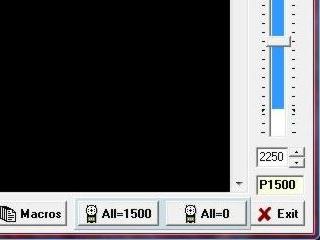 Figure 4.
From the main screen, click "Reg" to open the Registers page. Click "Default" to initialize default values.
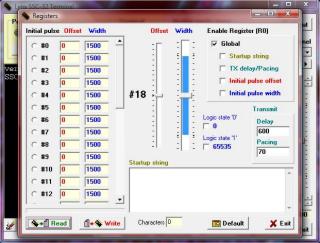 Figure 5.
Adjust the horizontal hip servos. Select servo #00, then adjust the "Offset" slider until the tibia is perpendicular to the robot's chassis as shown.
Do this for servos #00, 04, 08, 16, 20, 24.
Note: the mouse scrollwheel or keyboard arrow keys can be used for fine adjustments.
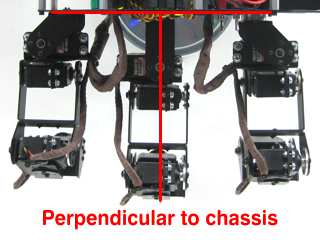 Figure 6.
Adjust the first vertical hip servos. Select servo #01, then adjust the "Offset" slider until the robot's femur is parallel to the ground as shown.
Do this for servos #01, 05, 09, 17, 21, 25.
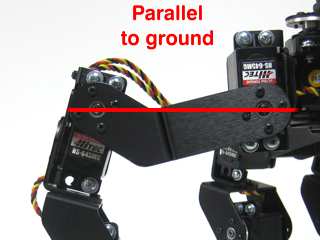 Figure 7.
Adjust the second vertical hip servos. Select servo #02, then adjust the "Offset" slider until the robot's ankle servo is directly underneath the second servo pivot point — from the pivot point to the foot servo should be perpendicular to the ground as shown.
Do this for servos #02, 06, 10, 18, 22, 26.
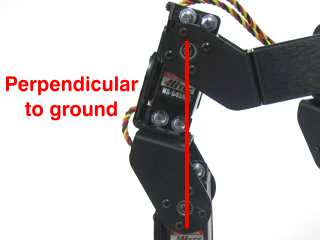 Figure 8.
Adjust the knee servos. Select servo #03, then adjust the "Offset" slider until the foot is parallel to the ground as shown.
Do this for servos #03, 07, 11, 19, 23, 27.
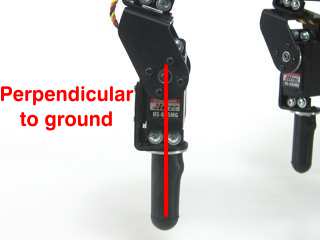 Figure 9.
Remove the center screws on the four corner hip servos (front right, front left, rear right, rear left). Pull the servo horn off and rotate the leg outward 3 clicks (45°). Replace the screws when finished.
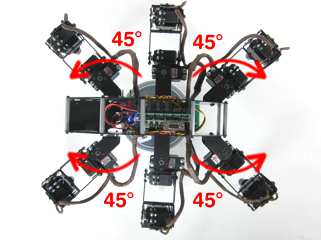 Figure 10.
Using the same method, adjust each leg's first vertical servo upward 1 click (15°). The long "C" bracket should now be parallel to the ground.
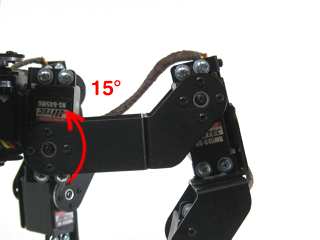 Figure 11.
Adjust each leg's knee inward 1 click (15°).
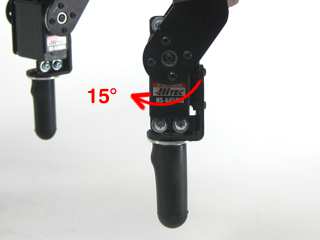 Figure 12.
Modify a 6" servo extender cable: remove the header pins so you have two female ends. Use an exacto knife to gently pry the tab up and pull the red wire free on one end. Cover the exposed connector with heat shrink to avoid accidental shorts.
Remove the TX and RX jumpers from the lower-right corner of the SSC-32, and plug the unmodified end of the cable in: yellow on TX, red on RX, black on ground.
See the schematic below for detailed information.
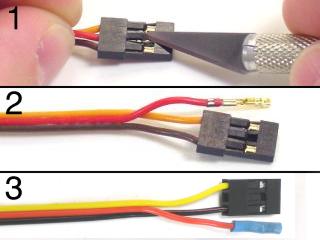 Figure 13.
Install the Playstation 2 cable as illustrated in Figure 14-1. Remove the ABC buttons / LED jumpers. Install the speaker enable jumper. Install your modified cable to I/O P10 and P11 with black toward the outside and yellow on the I/O pin. Consult the Bot Board II manual if needed.
Note: refer only to Figure 14-1 for PS2 connection information — cable colors may be outdated. A complete listing of possible colors is available here.
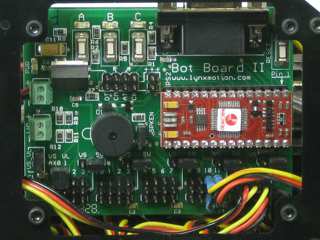 Figure 14-2.
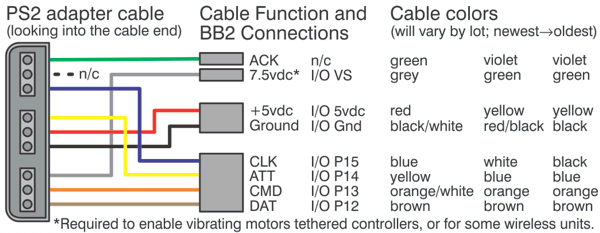
Figure 14-1.
Schematic. Double check your connections against the schematic below.
| Servo Letter Definitions | ||
|---|---|---|
| Left Right |
Rear Middle Front |
Knee Vertical Horizontal Ankle |
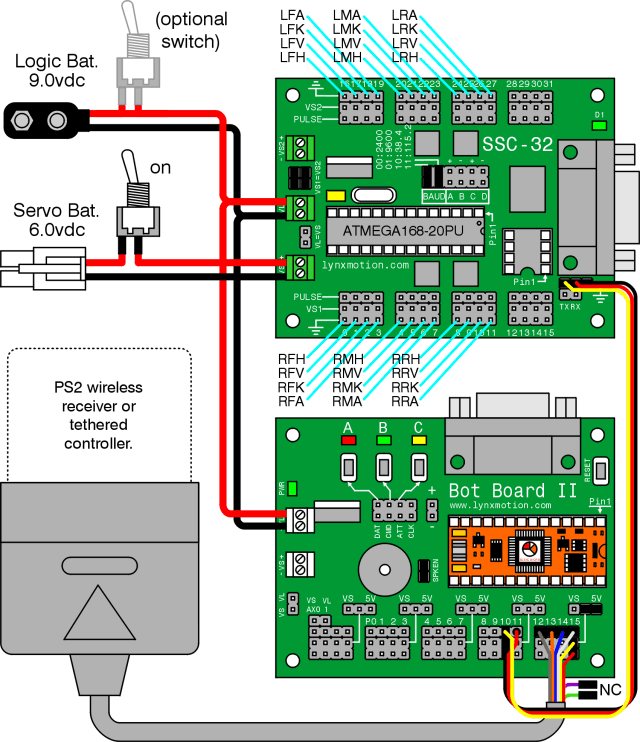
Schematic.
Use double-sided foam tape to secure the PS2 receiver to the robot's chassis as desired. Plug the receiver into the cable.
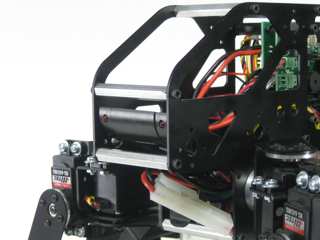 Figure 15.
Download the latest version of BASIC Micro Studio and the 4DOF T-HEX code here. Install and run to program the BASIC Atom Pro chip.
Consult the serial troubleshooting guide and the Basic Micro Studio Programming Guide if you have difficulties.
When programming is complete, you should hear a few short beeps. The legs will not snap to position until the START button on the PS2 remote is pressed. If you properly calibrated the servo offsets, the legs should be perfectly aligned.
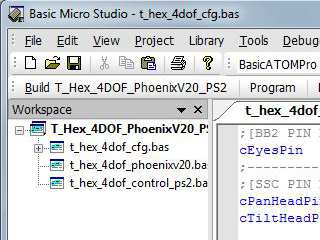 Figure 16.
If you hear continuous beeping when powering on, the PS2 controller is not connected properly or not functioning. Test it with a PlayStation 2 to verify.
This robot design was inspired by the original T-Hex by Kåre Halvorsen (Zenta). The Phoenix code was written by Jeroen Janssen (Xan). A big thanks to Kåre and Jeroen!
| Button | Walking Mode (default) |
|---|---|
| Select | Cycle through gaits |
| Right Joystick (Walk Mode 1) | Rotate |
| Left Joystick (Walk Mode 1) | Walk / Strafe |
| Right Joystick (Walk Mode 2) | — |
| Left Joystick (Walk Mode 2) | Walk / Rotate |
| L1 | Toggle Shift mode |
| L2 | Toggle Rotate mode |
| R1 | Toggle double gait travel speed |
| R2 | Toggle double gait travel length |
| R3 | Switch between walking modes |
| Start | Turn robot on/off |
| D-Pad L/R | Increase/Decrease speed by 50mS |
| D-Pad U/D | Body up/down 10mm |
| △ Triangle | Toggle body between 35mm walking height and ground |
| O Circle | Toggle Single Leg mode |
| X Cross | Toggle GP Player mode |
| □ Square | Toggle Balance mode |
| GP Player Mode | |
| Select | Switch sequences |
| R2 | Play sequence |
Table 17-2.
| Button | Shift Mode |
|---|---|
| Right Joystick | Shift body Y and rotate body Y |
| Left Joystick | Shift body X/Z |
| Button | Rotate Mode |
| Right Joystick | Rotate body X/Z |
| Left Joystick | Rotate body Y |
| Button | Single Leg Mode |
| Select | Switch leg |
| Right Joystick | Move leg Y (absolute) |
| Left Joystick | Move leg X/Z (relative) |
| R2 | Hold/release leg position |
Table 17-1.