

AL5 Programming Tutorial - PS2 & BotBoarduino
AL5 Programming Tutorial — PS2 RC Rev. 1
Updated January 11, 2012
Safety first! Wear eye protection and never touch a powered robot!
The purpose of this guide is to set up the robot arm to be controlled via a PlayStation 2 game controller using a BotBoarduino.
Note: PS2 control programs have been verified to work with Lynxmotion wireless controllers. Non-Lynxmotion controllers cannot be guaranteed.
What You'll Need
Any AL5 arm · BotBoarduino · PS2 Controller
Install the BotBoarduino as shown in Figure 1. Wire the board as shown in the schematic and Table 2 (Step 2). Verify all jumpers are correct.
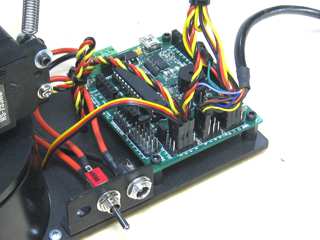 Figure 1.
Configure the BotBoarduino as illustrated in Table 2. For more information about setting up the force sensing resistor, see here.
BotBoarduino Jumpers
| Action | Setting |
|---|---|
| Connect | 6.0VDC battery or wall pack to VS |
| Connect | 9.0VDC battery to VL |
| Enable | Speaker |
| Connect | I/O 0-3 Power Bus to VS |
| Connect | I/O 4-7 Power Bus to VS |
| Connect | I/O 12-15 Power Bus to 5V |
BotBoarduino Connections (Table 2)
| Pin | Function | Pin | Function |
|---|---|---|---|
| P1 | N/A | P8 | PS2 Data |
| P2 | Base Rotate | P9 | PS2 Clock |
| P3 | Shoulder | P10 | Wrist |
| P4 | Elbow | P11 | Gripper |
| P5 | Speaker | P12 | Wrist Rotate |
| P6 | PS2 Attention | P13 | N/A |
| P7 | PS2 Command | A2 | Force Sensing Resistor |
Schematic. Double check your connections against the schematic below. You can check your PS2 cable colors and their functions here.
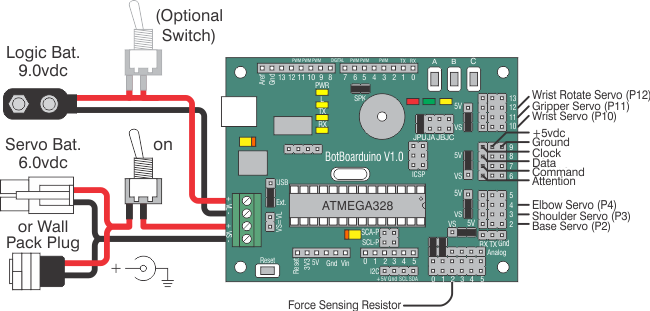
Schematic.
Download and install the Arduino Software. Install the PS2X library — instructions for installing libraries are here. Download the arm code here.
Open the .ino file and locate the arm selection section near the top. Remove the comments (//) from in front of the arm you are using. The code defaults to AL5D — if using another arm, add // before the AL5D line (see Table 3).
If using an FSR on the gripper, uncomment the line #define FSRG.
When finished, save your program and click "Upload".
Table 3 — Arm Selection
PS2 Controls — Table 4
| Button | Function | Button | Function |
|---|---|---|---|
| L Joy Up | Gripper Angle Up | R Joy Up | Gripper Up |
| L Joy Down | Gripper Angle Down | R Joy Down | Gripper Down |
| L Joy Left | Base Rotate Left | R Joy Left | Gripper Back |
| L Joy Right | Base Rotate Right | R Joy Right | Gripper Away |
| L1 | Wrist Rotate CW | R1 | Gripper Close |
| L2 | Wrist Rotate CCW | R2 | Gripper Open |
| L3 | N/A | R3 | N/A |
| D-Pad Up | Increase Speed | △ Triangle | Center Wrist Rotate |
| D-Pad Down | Decrease Speed | X Cross | Fully Open Gripper |
| D-Pad Left | N/A | □ Square | N/A |
| D-Pad Right | N/A | O Circle | N/A |
| Start | Enable / Disable Arm | Select | N/A |